Changelog
35 releases since 12 August 2026. Nublet updates itself.
0.31.0
20 November 2026
Build 352
Agents ask one at a time
Agents' questions wait in line, long screenshots stitch cleanly past chat bars, the Studio springs and says less, and setup is tidier.
New
- Questions from several agents wait in line, with ‹ › to step between them; none cancels another.
- While an agent asks, the other agents fold into one line in the notch.
Improved
- Studio layout changes spring by default (35% bounce, 0.35 s), and no card leaves the picture.
- Studio: click empty space to deselect; a click on one of several selected selects just that one.
- Studio: one-line notes, room around dividers, and ⓘ shows its text on hover.
- The full-screen preview's scrub bar is as wide as the video.
- Setup: the same layout on every step, fewer words, and Turn on for dictation where it's needed.
- Updates is back in Settings ▸ About.
Fixed
- Long screenshots of chats no longer repeat the message bar or a floating button at every seam.
- A long screenshot scrolled with the mouse wheel keeps stitching past the first screen.
- The welcome screen names all seven apps it counts.
0.30.0
19 November 2026
Build 351
A shorter setup that decides what runs
Setup in six screens that shows only the pages you'll use, a glass-dome magnifier, Q and W across the whole timeline, and a lighter notch.
New
- Setup asks how you'll use Nublet and shows those pages; the rest wait in Settings ▸ Notch ▸ Content.
- A Coding agents choice in setup: the agent companion turns on only if you pick it.
- Send anonymously, on setup's last screen: your picks, your Mac's model and the versions, only if you press it.
Improved
- Dictation setup takes 6 screens, down from 13, and Pro is offered when you reach a Pro feature.
- The magnifier is a glass dome: its rim bends the picture, parts the colours and catches the light.
- Q and W with nothing selected delete everything left or right of the playhead, on every track.
- The voice model loads when you first dictate, not at every launch, and the notch uses less CPU while agents work.
Fixed
- The Cursor page's Reset goes back to a new take's pointer, with Sway and Click bounce at 100%.
0.29.0
17 November 2026
Build 350
A real timeline, and your own default
Ten new Studio timeline tools, a default look for every new recording, a magnifier that moves like glass, and notch fixes.
New
- Ten timeline tools: nudge, mute and solo, loop a range, close gaps, collapse rows, copy and paste style, mic and system fades, a cover frame, freeze frame and speed ramps.
- Track headers to lock, hide or mute each row, and a full preview of the picture alone.
- Set as Default: start every new recording with your look, whole or one page at a time.
Improved
- The magnifier springs in and out like a real lens, with a soft shadow and a glass edge.
- Q and W trim whatever is selected, on any track, and every tool shows its name and shortcut on hover.
- A smaller app: the unused on-device text AI and Apple's speech engine are gone, and speech runs on Whisper Turbo.
Fixed
- A meeting reminder opens inside the notch instead of floating under it.
- Synced lyrics sit clear of the notch's edges, and a running timer's clock no longer hides under the camera.
- Saving a look in one Studio window could delete looks saved in another.
0.28.0
15 November 2026
Build 349
Share links, and every agent
Share videos from your own Cloudflare, approve seven more coding agents with an exact terminal jump, and choose how layouts move.
New
- Share links for Studio videos, served from your own Cloudflare account, with previews, views, a password and an expiry.
- Approve from the notch in Qwen Code, Qoder CLI, Droid, Devin CLI, OpenCode, Amp and Pi.
- Jump to the exact tab, split or tmux pane in Terminal, iTerm2, Ghostty, WezTerm, kitty and GNU screen.
- 8-bit alert sounds for approvals, questions and finished runs.
- Layout transitions: choose how each layout change moves, from a cut to a spring.
- Inspect marks that persist, and coding agents that read and answer them over MCP.
Improved
- Copy for Agent copies the words on Command-C and the pictures on Shift-Command-C, so chat apps get the details.
- Copy for Agent has four detail levels, and Measure opens in the mode you last used.
- An approval card closes before the agent's own time limit, so a slow answer is never taken as an allow.
Fixed
- Jumping to an agent now starts from the agent, so it can reach the exact tab.
0.27.1
13 November 2026
Build 348
Inspect, rebuilt
Measure's Inspect draws the box model, measures between boxes and reads a web page's own CSS; dictation moves to the Neural Engine.
New
- Select a box to see its padding, the gaps between its children and their values.
- Hold Option for the distance to the box under the pointer; Option-click pins it, and Copy for Agent lists it.
- Step out through the boxes under the pointer with a second click or [ and ]; Shift-click or drag to select several.
- E outlines every box in a colour for its kind. Rulers, and G for columns, rows or a grid.
- Exact CSS in browsers: the page's own padding, margin, type, colours and rules, when switched on in Settings.
Improved
- Copy for Agent writes one block per box: selector, text, size, box, type and colours, and what is wrong.
- Dictation runs on the Neural Engine: faster, and a fraction of the memory.
- Realistic shadows only, and the 80 older wallpapers leave the Background tab.
Fixed
- No more crash shortly after launch while the speech model warmed up.
- The Dev page's session list scrolls instead of running off the notch.
0.27.0
12 November 2026
Build 347
Agents can search what you point at
Copy for Agent gives coding agents names to search for, five more agents answer from the notch, and shadows look real.
New
- Copy for Agent names each element so an agent can find it in code: its role, id, classes, identifier and text.
- Approve commands from the notch in Codex, Copilot CLI, Cursor, Antigravity CLI and CodeBuddy Code.
- Takes with two cameras open with both cameras stacked beside the screen.
- Three new gradient families: cells, glows and ribbed glass.
Improved
- Realistic shadows everywhere, heavier, with room to fall.
- Sliders drag from anywhere, and their line shows on hover.
- Shorter tooltips, a cursor swing you can see, and Remove noise on for new recordings.
- 79 gradients, each distinct; a project that used a retired one still opens on it.
Fixed
- The speech model is no longer rebuilt every few minutes on a nearly full disk.
0.26.0
12 November 2026
Build 346
Inspect, two cameras and real shadows
Inspect any element for an agent, switch between two cameras, and give recordings realistic shadows.
New
- Inspect in Measure: hover any element to see its box, click to read its size, spacing, colours and contrast, and press ⌘C to copy it for an agent.
- Inspect finds every issue in a window, keeps elements on screen with your notes, and reads text size, weight and line height.
- Two cameras: swap them on a layout in one click, switch to whoever is talking, or cut to camera 2 when the screen is quiet.
- Export can also save the screen and each camera as video files of their own.
- Animated gradient backgrounds with mesh effects, and 154 presets including a new Vivid set.
Improved
- New recordings cast realistic shadows, like a real window: darker at the edge, falling below.
- Every Studio timeline tool says what it does when you hover it.
- Settings' sidebar floats as a rounded panel.
Fixed
- The notch opens when the pointer is at the very top of the screen.
0.25.20
9 November 2026
Build 345
Layouts move with your cuts
Cutting a recording now moves the Layout lane along with the footage.
Fixed
- Delete left, Delete right, deleting a clip and dragging a clip's edge now move the Layout lane along with the footage.
0.25.19
9 November 2026
Build 344
Area capture sees inside more apps
Area capture finds the parts of apps that don't report what's inside them.
Improved
- Area capture finds cards, paragraphs, sidebars and images in apps that don't report what's inside them, such as the Yab browser.
0.25.18
9 November 2026
Build 343
A timeline toolbar and one-key editing
A new timeline toolbar with one-key editing, and Remove silences fits every window.
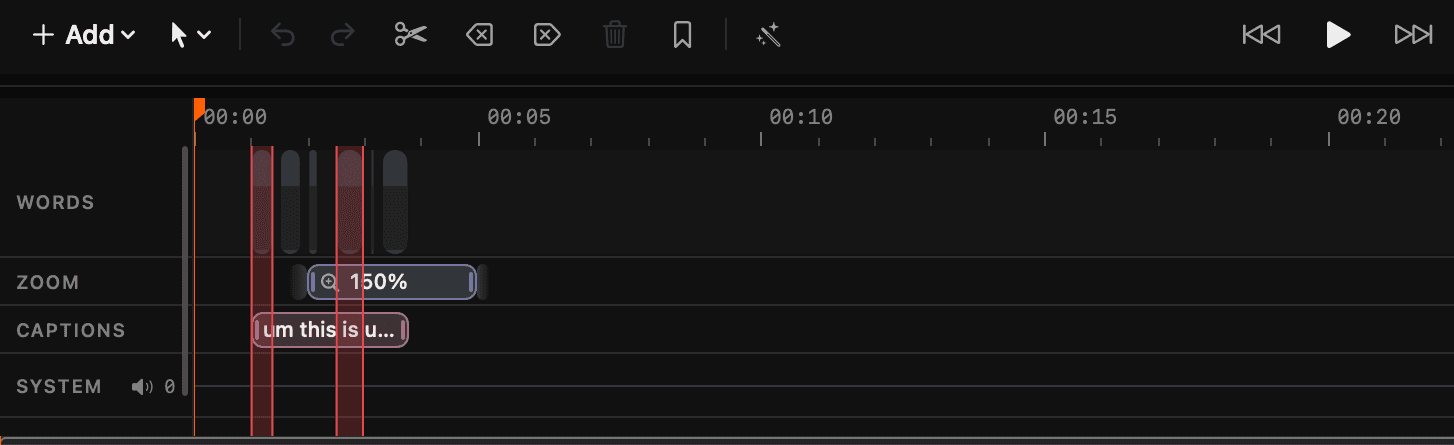
New
- A toolbar above the timeline: Split, Delete left, Delete right, Delete, markers and the Select tools.
- New keys: ⌘B splits, and Q and W delete either side of the playhead.
Improved
- Clicking the Words row selects that piece of footage, so Delete removes what you clicked.
Fixed
- Remove silences no longer runs off the bottom of the window.
- Scroll up and down over the timeline's rows, not only over their names.
0.25.17
9 November 2026
Build 342
Safe areas and iPhone recording
Detailed TikTok and Instagram safe areas, iPhone screen recording, and saved shots in Measure.
New
- Detailed TikTok and Instagram safe areas on the preview, never in the export.
- Record an iPhone or iPad screen over USB, and choose which apps' sound to record.
- Save what you measured as a screenshot, with the numbers on it.
Improved
- A calmer Export sheet, smoother close zooms and better gradients.
Fixed
- A memory leak in on-device speech that could grow over long sessions.
0.25.16
5 November 2026
Build 341
A simpler export
A simpler export, a teleprompter that scrolls on its own, and takes you can watch in the notch.
New
- Play any take right on the Teleprompter page.
Improved
- A simpler export: Fast, Balanced or Best, with every control under Custom settings.
- The teleprompter follows your voice or scrolls on its own at the pace you pick, with no text cut off.
- Tighter Live captions on a solid background, and a full-resolution preview by default.
0.25.15
5 November 2026
Build 340
Live captions by default
Live captions by default, cards you can move in every layout, and a sharper preview.
New
- Live captions: each word joins as it is said, and the box grows smoothly round it.
- Select and move every card on the preview in every layout, later layout blocks included.
Improved
- A sharper preview, and a Preview menu that says what it is drawn at, with a Full option.
- Window recordings open cropped to the window, and Clear History keeps your snippets.
0.25.14
4 November 2026
Build 339
A cleaner voice, still on your Mac
Noise removal that keeps your voice natural, and Figma-style moves on the preview.
New
- Move, resize and round the screen and camera on the preview: ⇧, ⌥, ⌘ and arrow keys as in Figma.
Improved
- Remove noise runs DeepFilterNet 3, built in: a cleaner, more natural voice, still on your Mac.
- Edit text in place with no ghost copy; line height, letter spacing, casing and caption alignment.
- A calmer Teleprompter page, a new installer, and fixes to pins, Annotate padding and the capture backdrop.
0.25.13
4 November 2026
Build 338
Scripts in scenes, and takes you keep
A teleprompter in the notch that follows your voice, scripts in scenes, and takes you never lose.
New
- Write a script in scenes and read it from a band in the notch that follows your voice, on your Mac.
- Record one scene at a time into one Studio project; Retry keeps the take, and you pick the one used.
- Studio: format text on the preview, snap to text, cards and a grid, and let AI tools you connect edit videos.
Improved
- Type a timer's length, and Deep Focus hides blocked apps instead of quitting them.
0.25.12
3 November 2026
Build 337
New recordings look finished
New recordings start finished-looking, the magnifier reaches further, and a tidier notch.
Improved
- New recordings open with motion blur, a 2× pointer, no ring on every click and, with a camera, zooms that keep the pointer clear of it.
- The magnifier's Size, Magnification, Rim and Glass reach further, and the Studio inspector no longer spills past its edge.
- Stash tiles keep their padding, and reopening the notch keeps your page while an agent works.
Fixed
- No red outline round the notch while a recording runs under a notice.
0.25.11
3 November 2026
Build 336
A glass magnifier and voiceovers
A glassier magnifier, typing sped up for you, and voiceovers from a typed script.
New
- Speed up typing finds long typing stretches and speeds them up. Opt-in: Detect typing notes when a key goes down, never which key.
- Voiceover from a script, spoken on your Mac in a system voice or your Personal Voice.
- Send the editable project as one .nubletproject file. Shorter Studio notes, and imports show as rows in the Voice list.
Improved
- Studio: the magnifier looks like glass, with a slight edge bend, colour fringe and rim shading, and grows out of the pointer.
0.25.10
3 November 2026
Build 335
A magnifier and transcript cuts
A bigger Studio: a magnifier, transcript cuts, format switches that re-aim, smart framing and podcast voice, plus a tidier Settings.
New
- Studio: Cut video or Cut transcript from a transcript selection, a Magnifier zoom, and format switches that re-aim zooms, cameras and captions.
- Smart framing keeps the pointer out from under the camera; the camera can hide while you're silent; Podcast voice (beta) for your mic.
- Recording: size the window before a take and hide desktop icons. Footage motion blur and opt-in Sharper close zooms on macOS 26.
Improved
- Settings is tidier: About is only about the app, and developer rows are gone. Capture's second press works again.
0.25.9
2 November 2026
Build 334
One price and a clear free tier
Pro is $49 once, a clear free tier, and a round of polish across the notch, onboarding and the editor.
New
- Pro is $49 once for 2 Macs. Free for good: the notch, the agent companion, plain screenshots, your last 10 clips and 2,000 dictation words a week.
Improved
- Notch Annotate gains Ratio, Padding and Corners, and the Mirror tab reads Camera while a recording has a camera.
- One saturated orange, a shorter onboarding that says plainly where text AI runs, and a new installer window.
Fixed
- Swiping a screenshot away works on an external monitor, and Settings opens without a stutter.
0.25.8
2 November 2026
Build 333
Dictation hears quiet microphones
Inter throughout, and dictation that hears quiet microphones to the last word.
Improved
- Nublet's text is Inter, bundled with the app, across Settings, the notch, onboarding and the Studio.
Fixed
- Dictation hears quiet microphones: no more empty takes or lost last words on soft speech.
- A "Thank you." you didn't say at the end of a take is dropped, and typing or fan noise no longer turns into words.
- Stash tiles fill the whole row, and an agent's question in the notch shows all its options again.
0.25.7
2 November 2026
Build 332
A tidier notch and Studio
A tidier notch and Studio: Stash rows that fill the width, the camera one click away mid-take, and a Dev page that stays a sensible height.
Improved
- Notch: Stash tiles fill the whole row, and the camera on the closed notch opens the camera page during a recording.
- Dev page: at most 420 pt tall, Ports and Terminal use all of it, and the terminal draws prompt icons with your Nerd Font.
- Studio: Background and Layout sit in a 2×2 grid, and the filler row reads Cut fillers & pauses.
- Pro and the notch tour say AI runs on your own key, not on this Mac.
0.25.6
2 November 2026
Build 331
AI on your own key, speech on your Mac
Text AI runs only on an AI key of your own, Whisper Turbo hears every take on your Mac, and the feedback form sends straight to us.
Improved
- AI: cleanup, rewrites, summaries and the assistant run only on a key you add, and Settings shows what it should cost you a month.
- Onboarding has one Connect your AI step, AI cleanup turns on only when you say yes, and Settings warns what a free Gemini key shares with Google.
- Speech: Whisper Turbo hears every take on your Mac, and Nublet no longer asks for Speech Recognition.
- The feedback form sends your message straight to us; Settings and onboarding are plain grey, and unlocking Pro plays over your desktop.
0.25.5
1 November 2026
Build 330
Dictation keeps your paragraphs
Dictation that keeps your paragraphs, lists and symbols, AI cleanup on by default where your Mac can carry it, and grey Settings and onboarding.
New
- Dictation: a new paragraph when you pause, spoken lists and symbols, longer self-corrections, and a style per app or site.
Improved
- AI cleanup is on by default on Macs whose own model does it well, and uses the names on your screen as spellings.
- Studio: new recordings captioned by themselves, fillers and pauses out in one pass, and several blocks edited at once.
- Onboarding opens the notch and offers a buy step; Settings and onboarding are grey throughout.
0.25.4
29 October 2026
Build 329
Transcripts for a whole playlist
Transcripts for a whole YouTube playlist at once, an automatic layout and a working camera cut-out in the Studio, and screenshots from the display you're on.
New
- Clipboard: get every transcript in a YouTube playlist, or in several selected links, in one go.
Improved
- Studio: an automatic layout for new recordings, a camera cut-out that works again, and Enhance voice by default.
- Screenshots: ⇧⌘3 takes the display your pointer is on.
- A calmer notch: recording controls that fill their bar, a Markup-style Annotate drawer, and Settings in one centred panel.
0.25.3
28 October 2026
Build 328
A crash fixed on long recordings
A fix for a crash while transcribing long recordings, Space to move a screenshot area again, and the Studio's padding and placement.
Improved
- Studio: a Padding slider, a position grid that always works, Reset, and snapping while you drag.
Fixed
- Transcribing a long recording no longer crashes Nublet.
- Holding Space while drawing a screenshot area moves the box again.
0.25.2
28 October 2026
Build 327
Recordings open ready to share
New recordings open ready to share in the Studio, a drawn screenshot area is taken the moment you let go, and fn+F12 no longer starts dictation.
Improved
- Studio: new recordings open side by side on a gradient, with pauses and filler words cleaned up, each with Undo.
- Screenshots: a drawn area is captured the moment you let go, as ⇧⌘4 does.
- The notch: words start on the left, a simpler Convert page and a tidier meeting card.
Fixed
- Dictation: fn with another key is a shortcut, not dictation.
0.25.1
28 October 2026
Build 326
The Studio leaves beta
The Studio is no longer a beta: it is on for everyone, one click from Home. Meetings keep every voice they clearly have, and long recordings lose fewer words.
New
- The Studio is on for everyone, with Studio beside Record on Home.
Improved
- Meetings: the other side of a group call keeps every voice instead of one "Speaker 1", and long recordings lose fewer words.
- Convert: a calmer page; drop files at the notch on the Stash or on Convert.
- Clipboard: each clip's right-click menu offers only what fits it.
0.25.0
27 October 2026
Build 325
The notch is the app
The notch is the app now: Settings is its one window and everything else lives in the notch. Your camera rides in the notch while you record, every meeting line is labelled, and the Studio beta gets procedural gradients.
New
- The notch is the app: Notes, the Voice Recorder, Clipboard History, Ask, the Teleprompter and a new Convert page live in the notch. The Home window is gone.
- Recording: your camera shows in the notch instead of a bubble, never in the video, and you can switch cameras mid-take.
- A new look: Nublet's pixel mascot and 16-bit scenery, and a calmer onboarding.
Improved
- Settings, redone: Settings ▸ Notch in five tabs, arrange the notch's Home page with a live preview, quick actions, and optional floating buttons.
- Meetings: transcribed in the language spoken, no invented lines, your mic's echo of the call removed, and every line labelled You or Speaker 1 (or their name).
- Studio editor (beta): 64 procedural gradients and a Gradient Editor, layouts you size card by card, layout keyframes, captions corrected several at once, tooltips and drag-to-change fields.
- Screenshots: the editor is redone. Sharp at Fit, real pixel sizes, and undo for every change.
0.24.0
22 October 2026
Build 324
Meetings like a notepad, and a Converter
Meetings work like a notepad, the Studio editor beta gets a new look, and a Converter turns PDFs, images, video, audio and documents into the file you need, on your Mac.
New
- Meetings: type your notes beside the call, and the summary written afterwards is built on them. Generate summary with templates, and What did I miss? during a call.
- A Meetings page lists every meeting Nublet recorded, searchable down to the words in the transcript.
- Converter: merge, split and compress PDFs, and convert images, video, audio and documents. It runs on your Mac and never writes over an original.
- The notch gains Back, and keeps whatever you're recording one tap away.
Improved
- Studio editor (beta): a dark graphite look, a Library window, a Clips bin, two cameras in one take, and editing by reading the transcript.
- One window: Notes, the Voice Recorder, Clipboard History, the Prompter and the chat are now pages of the Home window.
0.23.0
18 October 2026
Build 323
A voice assistant and notes of your own
A Voice Assistant, meetings that write themselves up, and notes of Nublet's own. AI and speech to text run on your Mac, or with a provider you pick and your own key.
New
- Voice Assistant: hold ⌃⌥A, ask, let go. Select text first and it's edited in place.
- Meetings: Nublet notices your calls, records both sides, and files a transcript and notes.
- Notes: plain Markdown files, with folders, search and AI actions.
- AI tools: connect Nublet to Claude Code, Claude Desktop or Cursor over MCP, and use the nublet command line.
- Also brings 0.22.0: recording controls in the notch, recordings that survive a crash, Measure, and the Studio editor beta.
Improved
- Dictation: Dictate & translate (⌃⌥T), optional AI cleanup, more voice models and a fuller History.
- Speech to text and AI stay on your Mac by default, or go to OpenAI, Anthropic, Gemini, Groq and others with your own key.
0.21.2
26 September 2026
Build 322
Three crashes fixed
A crash-fix release: three crashes found in Nublet's own crash log, and nothing else.
Fixed
- Transcribing a recording with no audio track no longer crashes.
- Exporting a Motion edit no longer fails on a frame the effects can't draw.
- Scroll capture and the floating shelf no longer crash while they lay out.
0.21.1
21 September 2026
Build 321
Steadier speech, sharper selection
A fix for a crash while the speech model loads, six fixes to area selection, and a seven-day trial.
Improved
- Clicking a detected window, button or panel takes the shot straight away.
- The trial is seven days.
Fixed
- Only one speech-model load runs at a time, which stops a crash on wake or after a settings change.
- Area selection: no leftover magnifier, the scroll wheel steps through nested elements, and Space moves a selection after you let go.
0.21.0
20 September 2026
Build 317
Motion, properly built
Motion, the recorder and video editor, properly built: what the editor shows is what the export writes.
New
- The pointer you actually used is drawn back in, with size, smoothing and click ripples.
- Zooms are clips you can see and drag, with auto-zoom from your own cursor activity.
- Captions are transcribed on your Mac, burned into the export, and correctable. Remove silences takes out the gaps.
Improved
- An area drag keeps its rectangle, with eight handles to adjust before you shoot.
- Live transcription starts in a second or two, not fifteen.
0.20.0
25 August 2026
Build 270
Transcripts keep their timings
Transcripts keep their timings, screenshots copy as SVG, and the most common crash is fixed.
New
- Click a transcript line to seek, and export as SRT, WebVTT, JSON, Markdown or text.
- Copy a screenshot as SVG with its text kept as text, or a public page as self-contained HTML.
Improved
- The recorder gained transport controls and transcribes non-English speech.
Fixed
- A single failed licence check can no longer delete a paid key.
0.19.0
12 August 2026
Build 266
The first public release
Voice, capture, clipboard, focus and your coding agent, in the notch and on your Mac.
New
- Dictation on your Mac: Apple's engine for everyday speech, or an optional Whisper model for about 99 languages, Indonesian among them.
- A visual clipboard history you can search, pin and paste back anywhere.
- ⌘⇧3/4/5 land straight in Quick Access.
- A companion for Claude Code and Codex: follow every step, approve tool calls, answer its questions, and see what the session cost.
- Focus timers with app blocking, a file shelf, the camera and now-playing controls.
Questions? nubletmac@gmail.com